
Pegas Offset — CNC Cutter Spacing & Clearance Checker for Fusion 360
Free
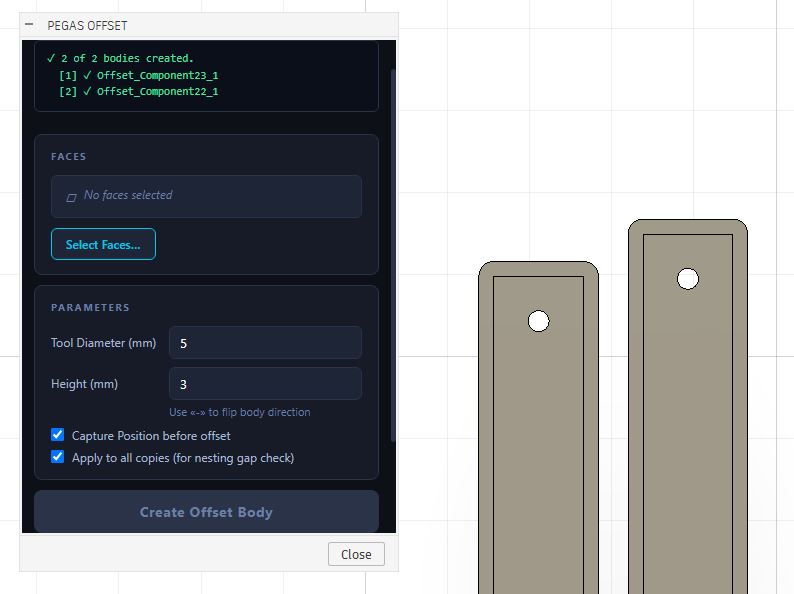
Pegas Offset — CNC Cutter Spacing & Clearance Checker for Fusion 360
The Problem: Ruined Material and Tool Collisions During Manual Nesting
Laying out components on a sheet of MDF or plywood is standard for CNC work, but determining whether your cutter will pass safely between closely nested parts is a guessing game. A single spacing miscalculation can cause the router bit to cut into adjacent parts or collide with hold-down clamps, leading to ruined sheets and broken bits.
The Agitation: Wasted Time on CAM Simulations
The usual way to check tool clearance is to switch to the Manufacture workspace, generate toolpaths, and run a complete simulation. If you find a collision, you must return to the Design workspace, move the bodies, and regenerate the CAM from scratch. This constant switching and recalculation wastes hours of valuable shop time.
The Solution: A Persistent 3D Tool Clearance Zone in the Design Workspace
Pegas Offset solves this by generating a persistent clearance zone 3d model directly in the Design workspace. Enter your tool diameter and material depth, and the add-in extrudes a 3D swept-volume ring around your component outline. If no clearance rings overlap or touch neighboring parts, your layout is 100% safe for profile cutting.
Why Woodworkers Choose Pegas Offset
🟢 Instant Visual Spacing Reference
- Feature: Generates a solid 3D ring around selected parts representing the tool radius.
- Advantage: Provides a permanent, real-geometry boundary in the Design viewport.
- Benefit: Drag and position components on your nested sheet visually, ensuring no toolpath overlaps occur.
🟢 Clamp and Fixture Collision Prevention
- Feature: Persistent clearance bodies can be checked against fixtures, screws, and clamps.
- Advantage: Detects potential tool paths colliding with metal clamps before exporting g-code.
- Benefit: Stop router bit hitting clamps and safeguard expensive tooling.
🟢 Multi-Component Assembly Support
- Feature: Integrated visibility controls (Hide all / Show all / Delete all offsets).
- Advantage: Manages multiple offset bodies simultaneously in large layouts with a single click.
- Benefit: Keeps your Fusion 360 browser tree neat and clean during layout revisions.
Case Study: Zero Layout Collisions and 12-Minute Setup Saved
- Before: CNC operators at a custom cabinet shop spent 15 minutes per sheet running CAM simulations and adjusting nesting coordinates to verify tool clearance for 18 mm plywood panels.
- After: By using Pegas Offset, they generated a milling tool clearance for nested sheets directly in the Design tab, nested parts visually, and exported to CAM with zero collisions, saving 12 minutes of CAD prep per sheet.
- Bridge: Seamless visual clearance check inside the layout workspace, eliminating back-and-forth CAM regenerations.